CADENCE SPB RELEASE 16.6 README for
System-in-Package (SiP) and Allegro Package Designer Products
This document provides detailed information for the System-in-Package (SiP) and Allegro Package Designer
(APD) products. Refer to the Cadence SPB Release 16.6 Readme for general release information.

SiP/Allegro Package Designer Product Compatibility Information

The System-in-Package (SiP), Allegro Package Designer (APD) and Cadence 3D Design Viewer products are
installed from the Cadence SPB/OrCAD 16.6 Install DVD. The Cadence IO Planner product, used for
concurrent co-design, is based on Encounter Digital Implementation (EDI) Systems technology and installed
from the EDI Systems CD ROM image. Both the Cadence SPB/OrCAD 16.6 Install DVD and the EDI Systems
CD ROM images contain versions of the OpenAccess (OA) software.

Virtuoso SiP Architect XL provides an integrated flow with the Virtuoso Floorplan, Layout, and Simulation
environment. Virtuoso products are installed from the Virtuoso (IC) CD ROM image.

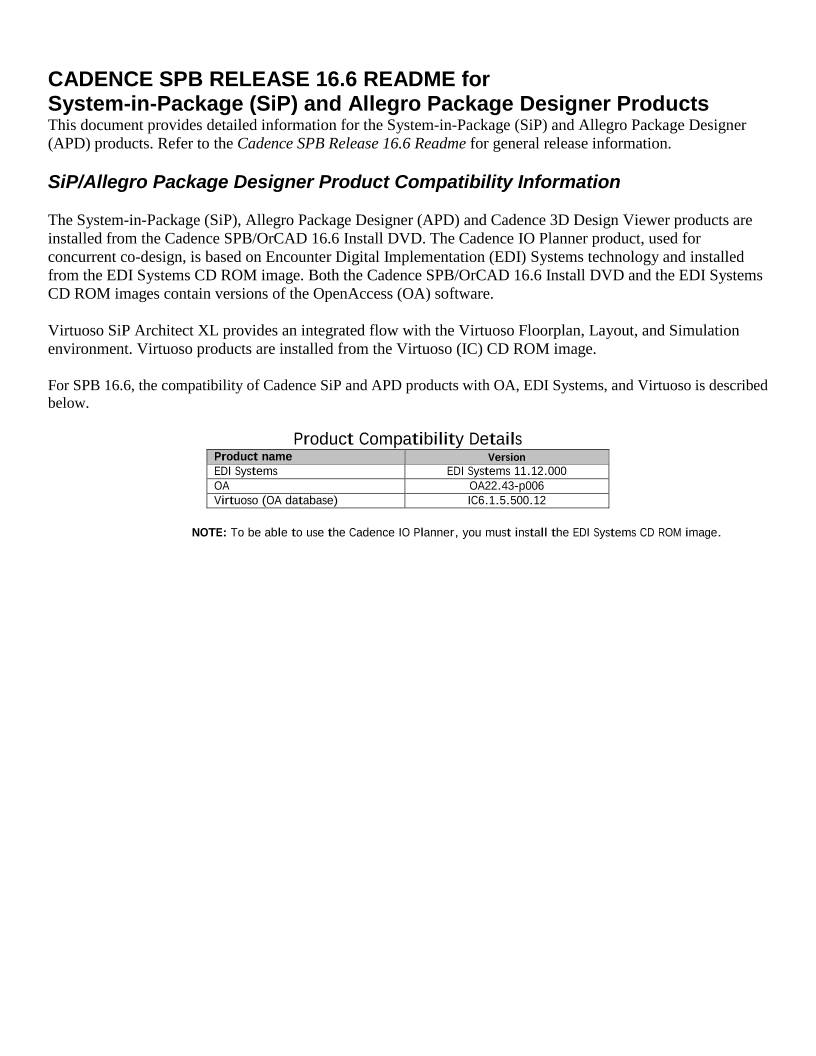
For SPB 16.6, the compatibility of Cadence SiP and APD products with OA, EDI Systems, and Virtuoso is described
below.

Product Compatibility Details
Product name Version
EDI Systems EDI Systems 11.12.000
OA OA22.43-p006
Virtuoso (OA database) IC6.1.5.500.12

NOTE: To be able to use the Cadence IO Planner, you must install the EDI Systems CD ROM image.


SiP 16.6 Computing Platform Support Matrix

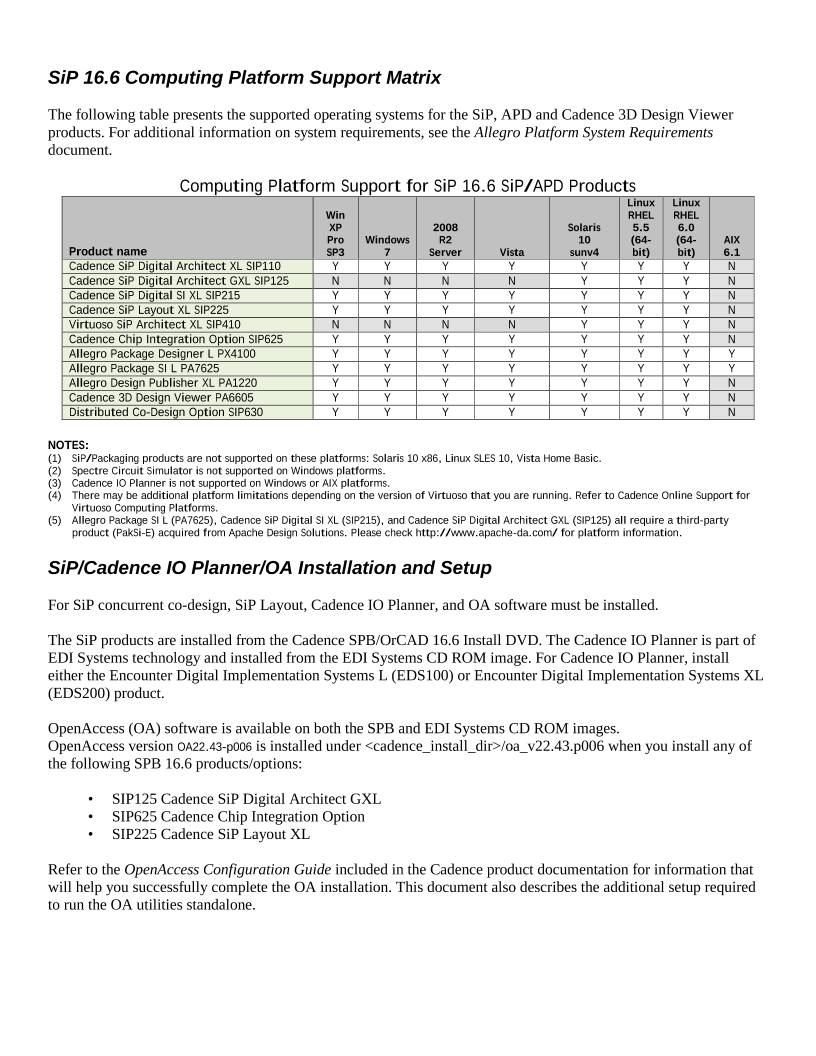
The following table presents the supported operating systems for the SiP, APD and Cadence 3D Design Viewer
products. For additional information on system requirements, see the Allegro Platform System Requirements
document.

Computing Platform Support for SiP 16.6 SiP/APD Products
Product name
Win
XP
Pro
SP3
Windows
7
2008
R2
Server


Vista
Solaris
10
sunv4
Linux
RHEL
5.5
(64-
bit)
Linux
RHEL
6.0
(64-
bit)
AIX
6.1
Cadence SiP Digital Architect XL SIP110 Y Y Y Y Y Y Y N
Cadence SiP Digital Architect GXL SIP125 N N N N Y Y Y N
Cadence SiP Digital SI XL SIP215 Y Y Y Y Y Y Y N
Cadence SiP Layout XL SIP225  Y Y Y Y Y Y Y N
Virtuoso SiP Architect XL SIP410 N N N N Y Y Y N
Cadence Chip Integration Option SIP625 Y Y Y Y Y Y Y N
Allegro Package Designer L PX4100 Y Y Y Y Y Y Y Y
Allegro Package SI L PA7625 Y Y Y Y Y Y Y Y
Allegro Design Publisher XL PA1220 Y Y Y Y Y Y Y N
Cadence 3D Design Viewer PA6605  Y Y Y Y Y Y Y N
Distributed Co-Design Option SIP630 Y Y Y Y Y Y Y N

NOTES:
(1) SiP/Packaging products are not supported on these platforms: Solaris 10 x86, Linux SLES 10, Vista Home Basic.
(2) Spectre Circuit Simulator is not supported on Windows platforms.
(3) Cadence IO Planner is not supported on Windows or AIX platforms.
(4) There may be additional platform limitations depending on the version of Virtuoso that you are running. Refer to Cadence Online Support for
Virtuoso Computing Platforms.
(5) Allegro Package SI L (PA7625), Cadence SiP Digital SI XL (SIP215), and Cadence SiP Digital Architect GXL (SIP125) all require a third-party
product (PakSi-E) acquired from Apache Design Solutions. Please check http://www.apache-da.com/ for platform information.

SiP/Cadence IO Planner/OA Installation and Setup

For SiP concurrent co-design, SiP Layout, Cadence IO Planner, and OA software must be installed.

The SiP products are installed from the Cadence SPB/OrCAD 16.6 Install DVD. The Cadence IO Planner is part of
EDI Systems technology and installed from the EDI Systems CD ROM image. For Cadence IO Planner, install
either the Encounter Digital Implementation Systems L (EDS100) or Encounter Digital Implementation Systems XL
(EDS200) product.

OpenAccess (OA) software is available on both the SPB and EDI Systems CD ROM images.
OpenAccess version OA22.43-p006 is installed under /oa_v22.43.p006 when you install any of
the following SPB 16.6 products/options:

• SIP125 Cadence SiP Digital Architect GXL
• SIP625 Cadence Chip Integration Option
• SIP225 Cadence SiP Layout XL

Refer to the OpenAccess Configuration Guide included in the Cadence product documentation for information that
will help you successfully complete the OA installation. This document also describes the additional setup required
to run the OA utilities standalone.

To configure the latest version of OA:

1. Install the EDI Systems software.
(Be sure you install it in a different hierarchy than any other version you have on your system.)
2. Install the SPB software.

NOTE: The order in which you install the EDI Systems or SPB software does not matter.

3. Before running the Cadence IO Planner, set the following:

setenv ENCOUNTER
setenv PATH ${ENCOUNTER}/bin:${PATH}
encounter -version
echo "OA Version is" oaGetVersion

SPB and EDI Systems software may contain different embedded builds of OA. You can see different versions
listed by oaGetVersion depending on the order in which you have the SPB and EDI Systems bin directories
listed in your PATH environment variable. SiP Layout and Cadence I/O Planner will each use its own
embedded build of OA and will be able to read/write data when working together in the IC/ Package co-design
flow (as they are both based on OA Data Model 4).

Note: If you use custom batch files or scripts to set up the SPB environment, add the following to the path. Some Allegro products
may not launch without this setting.
%CDSROOT%\OpenAccess\bin\win32\opt

SPB 16.6 SiP/Cadence IO Planner Interoperability

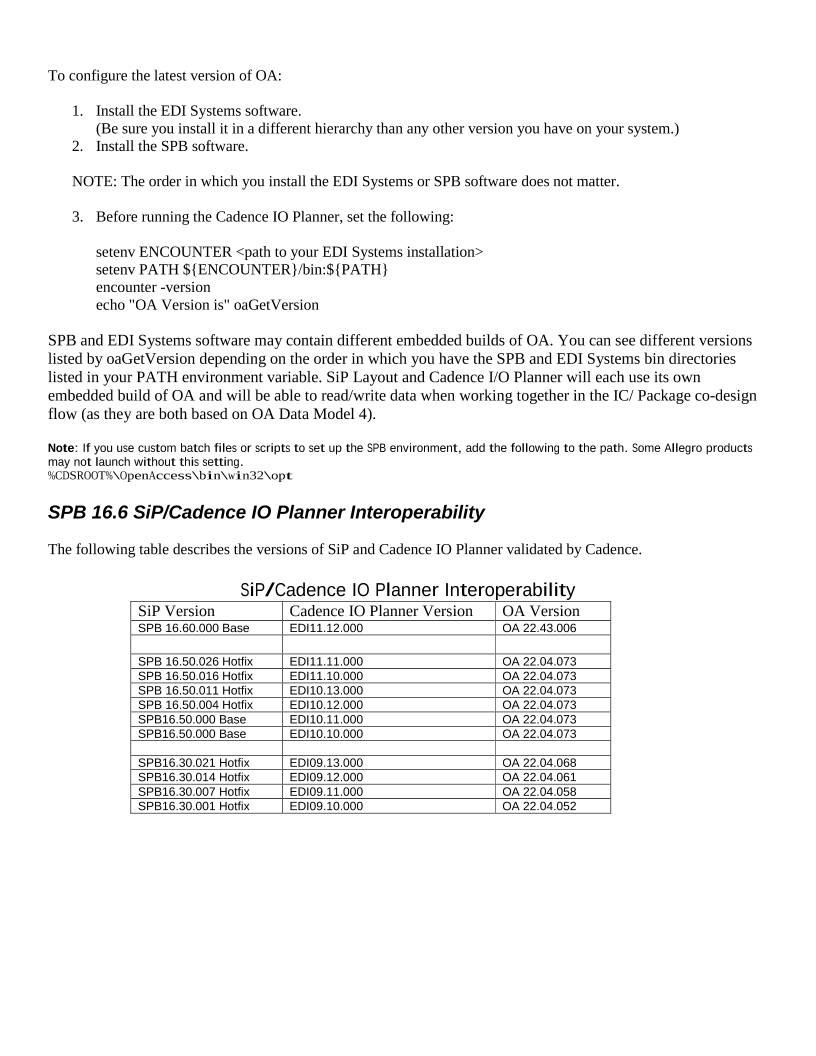
The following table describes the versions of SiP and Cadence IO Planner validated by Cadence.

SiP/Cadence IO Planner Interoperability
SiP Version Cadence IO Planner Version OA Version
SPB 16.60.000 Base EDI11.12.000  OA 22.43.006

SPB 16.50.026 Hotfix EDI11.11.000 OA 22.04.073
SPB 16.50.016 Hotfix EDI11.10.000 OA 22.04.073
SPB 16.50.011 Hotfix EDI10.13.000 OA 22.04.073
SPB 16.50.004 Hotfix EDI10.12.000 OA 22.04.073
SPB16.50.000 Base  EDI10.11.000  OA 22.04.073
SPB16.50.000 Base  EDI10.10.000  OA 22.04.073

SPB16.30.021 Hotfix  EDI09.13.000  OA 22.04.068
SPB16.30.014 Hotfix  EDI09.12.000  OA 22.04.061
SPB16.30.007 Hotfix  EDI09.11.000  OA 22.04.058
SPB16.30.001 Hotfix  EDI09.10.000  OA 22.04.052


Virtuoso SIP Architect Installation and Setup
Virtuoso Analog Design Environment (ADE) and Virtuoso Schematic Editor must be installed as part of the
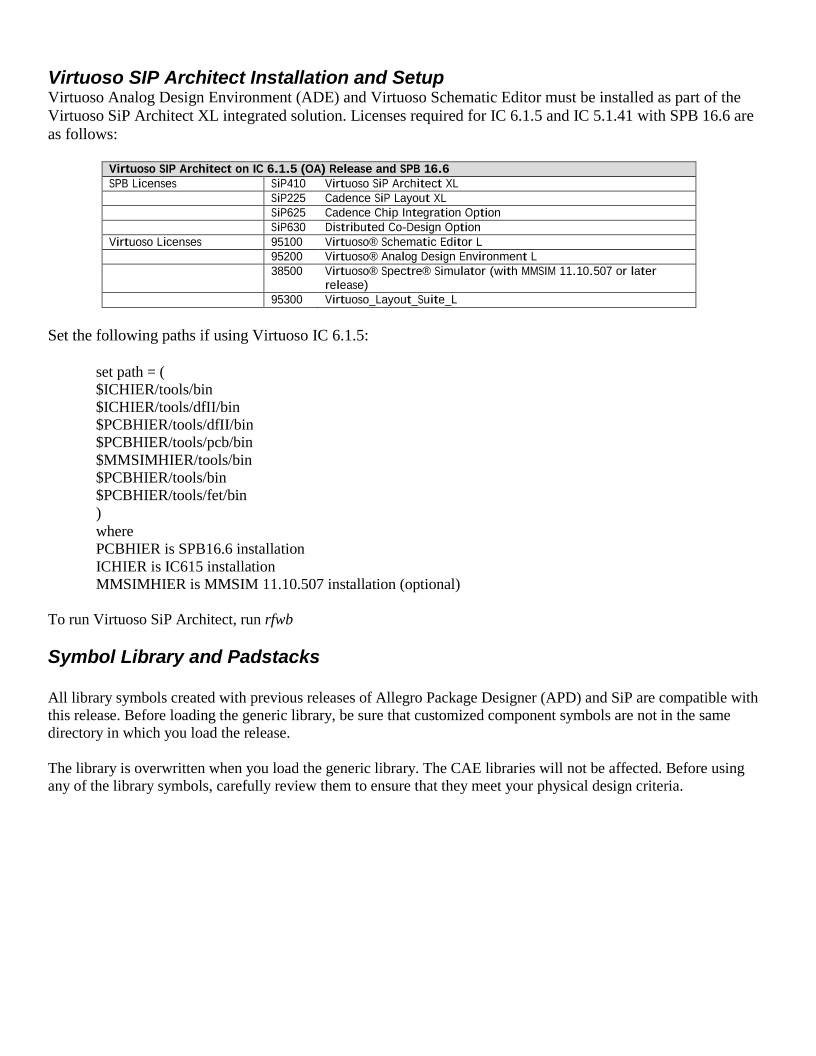
Virtuoso SiP Architect XL integrated solution. Licenses required for IC 6.1.5 and IC 5.1.41 with SPB 16.6 are
as follows:

Virtuoso SIP Architect on IC 6.1.5 (OA) Release and SPB 16.6
SPB Licenses SiP410 Virtuoso SiP Architect XL
 SiP225 Cadence SiP Layout XL
 SiP625 Cadence Chip Integration Option
 SiP630 Distributed Co-Design Option
Virtuoso Licenses 95100 Virtuoso® Schematic Editor L
 95200 Virtuoso® Analog Design Environment L
 38500 Virtuoso® Spectre® Simulator (with MMSIM 11.10.507 or later
release)
 95300 Virtuoso_Layout_Suite_L

Set the following paths if using Virtuoso IC 6.1.5:

set path = (
$ICHIER/tools/bin
$ICHIER/tools/dfII/bin
$PCBHIER/tools/dfII/bin
$PCBHIER/tools/pcb/bin
$MMSIMHIER/tools/bin
$PCBHIER/tools/bin
$PCBHIER/tools/fet/bin
)
where
PCBHIER is SPB16.6 installation
ICHIER is IC615 installation
MMSIMHIER is MMSIM 11.10.507 installation (optional)

To run Virtuoso SiP Architect, run rfwb

Symbol Library and Padstacks

All library symbols created with previous releases of Allegro Package Designer (APD) and SiP are compatible with
this release. Before loading the generic library, be sure that customized component symbols are not in the same
directory in which you load the release.

The library is overwritten when you load the generic library. The CAE libraries will not be affected. Before using
any of the library symbols, carefully review them to ensure that they meet your physical design criteria.


 设备数据采集
 工程招标采购
 搞笑表情
搞笑表情 微信头像
微信头像 CWMS冷库管理系统
 美女图片
美女图片 APP小游戏
 PPT模板
PPT模板 WMS仓库系统
 软件开发
软件开发